

Quick Guide to Shopify Website Build Time
If you’re diving into e-commerce, you’ve likely heard of Shopify’s towering reputation. It combines user-friendliness with powerful features, allowing even those without a tech background to craft their online stores. Here’s a snapshot for the eager:
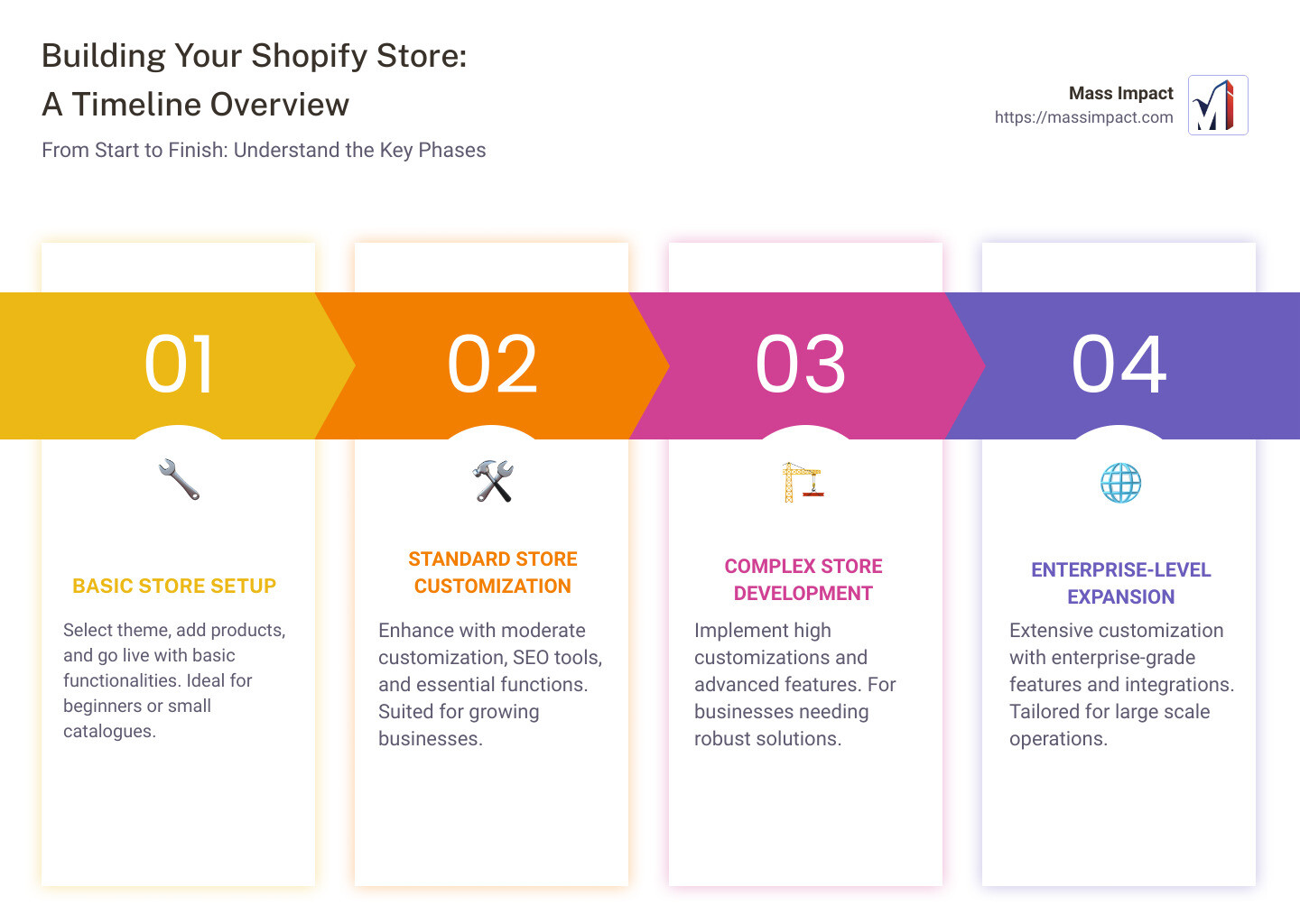
- Basic Store: 1 to 2 weeks
- Standard Store: 4 to 8 weeks
- Complex Store: 8 weeks or more
- Enterprise-Level Store: 3 to 6 months or more
These timelines are broad estimates and can be influenced by factors such as feature complexity, customization, and the amount of content you plan to include.
Shopify’s drag-and-drop functionality and deep customization options have made it a go-to choice for business owners seeking to establish or expand their online presence. Whether you’re looking to set up a simple, out-of-the-box solution or a complex, highly customized web of online services, Shopify’s platform is designed to cater to your needs. Understanding the variables that affect the build time of a Shopify website is crucial in planning your project timeline effectively.
In this introduction to building a Shopify website, we acknowledge the vastness of Shopify’s allure — simplicity masked in sophistication. Swiftly establishing itself as a leading name in e-commerce solutions, Shopify empowers you with tools for creating an online store that’s as unique as your brand, without the nightmare of coding. Whether aiming for quick setup or intricate designs reflecting your brand’s essence, navigating Shopify’s world promises a journey filled with innovation, ease, and endless possibilities.
Understanding Shopify’s Platform
Shopify stands as a beacon for those aspiring to carve out their own niche in the digital marketplace. Its ease of use and drag-and-drop functionality are not just buzzwords but the very pillars upon which the Shopify experience is built. Let’s dive deeper into what makes Shopify a go-to platform for both novices and seasoned entrepreneurs alike.
Ease of Use
Imagine painting a masterpiece but instead of a brush, you have a magic wand. That’s what using Shopify feels like. The platform is designed with a clear, intuitive interface that makes building an online store not just easy, but enjoyable. You don’t need to be a tech wizard to bring your dream store to life. Whether it’s uploading products, customizing your storefront, or setting up payments, Shopify guides you through each step with ease.
Drag-and-Drop Functionality
The heart of Shopify’s user-friendly design lies in its drag-and-drop editor. This feature allows you to customize your site by simply moving elements around the page. Want to add a product image or a testimonial section? Just drag it to where you want it. This hands-on approach not only simplifies the design process but also gives you the freedom to experiment with layouts until you find the perfect look for your store.
Shopify Basic Plans
Shopify understands that every business has unique needs and budgets. That’s why it offers a variety of plans, starting with the Basic Shopify plan. This option provides all the essentials for starting a new business, including website and blog creation, unlimited products, and 24/7 support. It’s an affordable way to get your online store off the ground, with room to grow as your business expands.
Trial Period
Taking the first step can be daunting, but Shopify’s 14-day free trial offers a risk-free way to explore everything the platform has to offer. This trial period is a testament to Shopify’s confidence in its service. It gives you full access to its features, allowing you to build and test your store before making any investment. It’s a golden opportunity to familiarize yourself with the platform and ensure it meets your business needs.
In summary, Shopify’s platform is built on principles of simplicity and flexibility, making it accessible to everyone from solo entrepreneurs to large enterprises. Its drag-and-drop editor, diverse plans, and generous trial period reflect a commitment to user satisfaction and success. As we continue to explore the steps involved in building a Shopify website, Shopify is designed to empower you, turning the daunting task of launching an online store into an exciting journey of creativity and discovery.
Continuing on, let’s look at the specific steps you’ll take in this adventure, starting with registering your Shopify account.
Key Factors Influencing Build Time
When embarking on the journey of creating a Shopify website, several key factors can significantly influence the time it takes to bring your vision to life. Understanding these factors is essential to manage expectations and plan effectively. Let’s dive into the specifics.
Feature Complexity
The complexity of the features you wish to include in your Shopify store plays a significant role in determining the build time. For instance, integrating advanced analytics, custom checkout processes, or interactive product visualizations can add to the development time. The more complex your requirements, the longer it will take to implement and test these features to ensure they work seamlessly.
Customization
Customization is another critical factor that affects how long it takes to build a Shopify website. Opting for a theme straight out of the box is the quickest route, but tailoring the design to match your brand identity requires more time. This includes modifying the theme’s layout, colors, and fonts, as well as creating custom graphics and integrating third-party apps that align with your business needs.
Content
The volume and type of content you plan to include also impact the build time. High-quality product descriptions, engaging blog posts, and compelling images or videos all take time to create and optimize. Additionally, if you’re planning to migrate content from an existing website, the process of transferring and formatting this content to fit your new Shopify store can be time-consuming.
User Experience
Lastly, ensuring a positive user experience is crucial but can add to the build time. This encompasses optimizing the site’s navigation, ensuring mobile responsiveness, and reducing page load times. The goal is to create a smooth, intuitive shopping experience for your customers, which requires careful planning and often, iterative improvements based on user feedback or testing.
Each of these factors contributes to the overall timeline for building a Shopify website. By understanding and planning for these aspects, you can set realistic timelines for your project. That while it’s tempting to rush the process, taking the time to focus on these key areas can significantly enhance the quality and success of your online store.
For a more detailed breakdown on the time it might take to build a Shopify website with moderate branding, consider consulting experiences shared by others in the community, such as this insightful discussion on Quora .
As we continue to explore the steps involved in building a Shopify website, next, we’ll delve into the costs associated with setting up your store. From subscription fees to premium themes and developer charges, understanding these expenses is crucial for budgeting and planning your e-commerce journey.
Step-by-Step Guide to Building a Shopify Website
Building a Shopify website can be an exciting journey into e-commerce. Whether you’re launching your first store or moving an existing business online, Shopify’s user-friendly platform makes the process straightforward. Let’s break down the steps to get your Shopify website up and running.
Register with Shopify
The first step is quite simple: create your Shopify account. Head over to Shopify’s website and sign up using your email address and a secure password. This step is your entry point into the Shopify ecosystem, where you’ll manage your products, sales, and customer interactions.
Selecting and Customizing a Theme
Once your account is set up, it’s time to make your store visually appealing. Shopify’s Theme Store hosts a variety of themes tailored to different industries and aesthetics. Whether you prefer a minimalist design or something more vibrant, there’s a theme for every taste.
- Custom Themes: For those seeking a unique look, custom themes are available. These allow more profound customization to ensure your brand stands out.
- Mobile-Friendly: In today’s mobile-first world, ensuring your theme is responsive and mobile-friendly is crucial. A significant portion of online shopping is done via smartphones, so your store needs to look good and function well on all devices.
Adding Products
The heart of your Shopify store is its products. Here’s where you detail what you’re selling. Each product entry should include:
- Product Descriptions: Write clear and compelling descriptions that highlight the benefits and features of your products.
- Images: High-quality images are essential. They should showcase your products from various angles and in different settings.
- Pricing: Set competitive prices for your products. Remember to factor in costs like shipping and taxes.
Setting Up Essential Functions
To ensure your store operates smoothly and engages customers, several essential functions need to be set up:
- SEO Tools: Use Shopify’s built-in SEO tools to help your store rank higher in search engine results. This includes optimizing your product descriptions, titles, and images.
- Email Marketing: Set up email marketing campaigns to keep in touch with your customers. Promote new products, sales, or content directly to their inboxes.
- Push Notifications: Engage with your customers through push notifications. These can alert customers about new products, sales, and other updates.
Finalizing Your Store
Before launching, make sure all the technical aspects of your store are in order:
- Payment Gateways: Connect your preferred payment gateways to accept payments from customers worldwide.
- Domain Registration: Choose a unique domain name for your store and register it. This enhances your brand’s professionalism and makes it easier for customers to find you.
- Shipping Settings: Configure your shipping settings based on your products and where you plan to ship them. This includes setting up shipping rates, carriers, and delivery times.

By following these steps, you’ll have laid a solid foundation for your Shopify store. The key to success in e-commerce is not just launching your store but continuously optimizing and improving it to meet your customers’ needs. With Shopify’s extensive features and supportive community, you’re well-equipped to take your business to new heights.
We’ll explore the various costs associated with building a Shopify website. This understanding will help you budget effectively and make informed decisions as you develop your online presence.
Costs Associated with Building a Shopify Website
Building a Shopify website involves various expenses that you need to consider to budget effectively. Let’s break down these costs to help you understand what to expect.
Shopify Subscription: The backbone of your online store is the Shopify platform itself. Shopify offers several plans, but the basic plan starts at $29 per month. This plan includes all the essentials you need to get started. For businesses looking to scale or access more advanced features, higher-tier plans are available, such as Shopify at $79 per month and Advanced Shopify at $299 per month. The right plan for you depends on the size of your business and the features you need.
Domain Costs: Your domain name is your online address and is crucial for branding. Shopify allows you to purchase a domain directly through their platform, or you can buy one from third-party providers. Prices vary, but you can expect to pay around $14 per year for a .com domain. This cost is relatively minor but an essential part of establishing your online identity.
Premium Themes: While Shopify offers a range of free themes, you might find that a premium theme better suits your brand’s aesthetic and functionality needs. Premium themes can range from $140 to $180 and offer more customization options and unique designs. This one-time investment can significantly impact your store’s look and feel, enhancing the user experience.
Developer Fees: Depending on how customized and complex you want your Shopify store to be, you might need to hire a Shopify developer. Developers can help with custom themes, special features, or app integrations that go beyond the basic setup. The cost for a developer can vary widely based on their expertise and your project’s scope. For a basic setup, you might spend a few hundred dollars, but for more complex sites, costs can escalate into the thousands.
Additional Considerations: Beyond these primary costs, consider other potential expenses such as apps to extend your store’s functionality, marketing and SEO tools to attract customers, and any custom graphics or branding work. Some apps have monthly fees, so it’s important to factor these into your ongoing expenses.
Estimating Your Total Costs
To give you a rough idea, setting up a basic Shopify store could cost as little as $29 for the subscription, plus the cost of a domain. However, for a more customized store with a premium theme and some developer assistance, you might be looking at an initial investment of $500 to $2,000 or more, with ongoing costs for your subscription, domain renewal, and any apps or services you use.
Planning Ahead: The best approach to managing these costs is to plan ahead. Determine what features and functionality are must-haves for your store and what you can add later as your business grows. This way, you can start with a manageable budget and scale your expenses as you see revenue coming in.
Building a Shopify website is an investment in your business’s future. By understanding and planning for these costs, you can create a successful online store that serves your customers’ needs without breaking the bank.
As you move forward, consider how the time and money you invest in your Shopify store can drive growth and sales. In the next section, we’ll explore time estimates for different types of Shopify stores, helping you plan the development process more effectively.
Time Estimates for Different Types of Shopify Stores
Building a Shopify store can vary significantly in time, depending on several factors like the complexity of the store, the level of customization, and the number of products. Here’s a breakdown to help you estimate how long it might take to launch your own Shopify website:
Basic Store
A Basic Store is typically the fastest to set up. With an out-of-the-box setup and minimal customization, you could have your store running in just 1 to 2 weeks. This type of store is perfect for those who are just starting out or businesses that want to go live quickly with a limited selection of products.
Standard Store
For those looking for a bit more customization and have a broader selection of products, a Standard Store might be the right choice. Setting up a standard store with moderate customization could take anywhere from 4 to 8 weeks. This includes time for selecting and customizing your theme, adding a larger number of products, and implementing basic SEO and marketing strategies.
Complex Store
When you venture into creating a Complex Store, the timeline extends due to high customization needs. These stores might require custom-built themes, advanced feature integrations, and a large catalog of products. Therefore, building a complex Shopify store could take 8 weeks or more. This type of store is suited for businesses with specific needs that can’t be met by standard themes or configurations.
Enterprise-Level Store
At the top end of the spectrum, we have the Enterprise-Level Store. These stores require extensive customization, sophisticated integrations with external systems, and often need to handle high volumes of traffic and sales. Building such a platform can take 3 to 6 months or more. Enterprise-level stores are ideal for large businesses or those planning to scale up quickly.
It’s essential to understand that these time estimates are just starting points. The actual time to build your Shopify store can vary based on your specific requirements, readiness of your content, and whether you’re doing it yourself or hiring professionals. The goal is not just to launch but to create a store that effectively meets the needs of your customers and stands out in a crowded marketplace.
We’ll delve into strategies on how to accelerate your Shopify build, ensuring you not only meet your timeline but also maximize the efficiency of your build process.
Moving forward, understanding how long does it take to build a Shopify website is just the beginning. The real success comes from continuous improvement and leveraging expertise in areas like digital marketing and SEO to grow your online presence. Stick around as we cover more on this in the following sections.
Accelerating Your Shopify Build
Building a Shopify store can be a thrilling journey, but it’s understandable that you might want to speed up the process. Let’s dive into how you can do just that, focusing on planning, tapping into Shopify’s ecosystem, and prioritizing utility.
Planning
The old saying “fail to plan, plan to fail” couldn’t be more true when it comes to creating your Shopify store. A clear plan acts as your roadmap, helping you navigate through the build process more efficiently. This means:
- Defining your niche and target audience upfront to make informed decisions about design and product selection.
- Selecting your theme and features early on to avoid time-consuming changes later.
- Organizing your content and product details before you start building, so everything is ready to upload.
A solid plan can significantly reduce the time spent on revisions and adjustments.
Shopify’s Ecosystem
Shopify’s vast ecosystem is designed to support merchants in quickly setting up and scaling their stores. Utilize it to your advantage:
- Themes and Templates: Shopify offers a wide range of customizable themes that are ready to use. Picking a theme that closely matches your vision can save weeks of development time.
- Apps and Integrations: Whether it’s email marketing, SEO, or social media integration, there’s almost always an app for that. These tools can add functionality to your store without the need for custom development.
- Shopify Experts: For tasks beyond your skill set, consider hiring Shopify Experts. They can tackle complex customizations or troubleshoot issues, often much quicker than going it alone.
Prioritizing Utility
While it’s tempting to implement every feature under the sun, prioritizing utility over variety can get your store up and running faster. Ask yourself:
- Does this feature directly support my sales or improve the customer experience? If not, it might be best to leave it out of your initial build.
- Can I add this feature later? Shopify’s platform is flexible, allowing you to introduce new elements as your store grows.
By focusing on what truly matters to your customers, you can launch your store sooner and start generating sales. This approach also keeps the site clean, making navigation easier for your customers.
In summary, accelerating your Shopify build requires a mix of good planning, leveraging the resources available within Shopify’s ecosystem, and focusing on the features that offer the most utility. The goal is to launch an effective store, not a perfect one. You can always iterate and improve as you go.
Moving forward, understanding how long does it take to build a Shopify website is just the beginning. The real success comes from continuous improvement and leveraging expertise in areas like digital marketing and SEO to grow your online presence. Stick around as we cover more on this in the following sections.
Common Questions on Building a Shopify Website
How long does it take to see success with a Shopify store?
Success with a Shopify store doesn’t follow a one-size-fits-all timeline. It hinges on product selection and marketing strategy. Choosing products that meet a clear market need and executing a solid marketing plan can accelerate success. Typically, it can take a few months to see significant traffic and sales, but with the right approach, some stores see quicker results.
Can I migrate my existing website to Shopify?
Yes, migrating your existing website to Shopify is feasible, thanks to Shopify’s data transfer tools. These tools simplify moving product information, customer data, and order history. The process duration varies based on the volume of data but ensuring a seamless transition for your customers is Shopify’s priority in such migrations.
Is it possible to build a Shopify store without coding skills?
Absolutely. Shopify is designed to be user-friendly, allowing store owners to build and customize their online shop without needing to code. With theme customization options and a vast library of app integrations, you can tailor your Shopify store to match your brand and enhance functionality, all without touching a single line of code.
Moving forward, understanding how long does it take to build a Shopify website is just the beginning. The real success comes from continuous improvement and leveraging expertise in areas like digital marketing and SEO to grow your online presence. Stick around as we delve deeper into optimizing your Shopify store for success in our next sections.
Conclusion
Building a Shopify website is an exciting journey that blends creativity with technology. But remember, launching your site is just the beginning. The digital landscape is constantly evolving, and so should your online store. That’s where the concept of continuous improvement comes into play. It’s not just about fixing bugs or updating product listings; it’s about refining user experience, enhancing features, and adapting to the ever-changing market trends and consumer behaviors.
At Mass Impact, we understand the importance of staying ahead in the game. Our expertise in digital marketing enables us to help you not only build a visually appealing and functional Shopify store but also ensure it thrives in a competitive online environment. From SEO strategies that improve your store’s visibility to social media marketing that engages with your target audience, we’re here to support every step of your digital journey.
The question of how long does it take to build a Shopify website isn’t just about the time it takes to go live. It’s about investing in your store’s future, continuously improving, and leveraging the right expertise to grow your business online. With Mass Impact by your side, you have a partner dedicated to helping you make the most out of your Shopify store.
We’re not just about building websites; we’re about building successful online businesses. Let us help you turn your vision into reality and drive your Shopify store to its full potential. Discover how our digital marketing services can propel your online presence and sales. Together, let’s navigate the digital landscape and achieve remarkable success.
Ready to elevate your Shopify store? Explore our services at Mass Impact and let’s start this exciting journey together.