

Yes, you can build a website with Shopify!
- Shopify is both an ecommerce platform and a website builder.
- Designed for ease and simplicity, it’s suitable for selling products and setting up an informational site.
- Offers a variety of templates and design customization tools.
- Includes Shopify Payments for easy payment processing.
Building a website can seem like climbing a mountain, especially if you’re juggling running your business at the same time. Enter Shopify – a tool that promises to simplify the journey, making it possible for you to establish an online presence without needing to become a tech whiz overnight. Whether your goal is to sell products or share information, Shopify serves as a comprehensive platform covering your needs from A to Z.
Shopify stands out in the crowded market of website builders by specifically tailoring its services to ecommerce. This doesn’t mean it’s limited to just selling online; it’s also fully capable of hosting a purely informational site. With its user-friendly interface, a broad spectrum of themes, and a plethora of plugins to extend functionality, Shopify makes it easy to get a professional-looking site up and running.
Understanding Shopify’s Capabilities
When considering whether can I build a website with Shopify, it’s crucial to dive into what Shopify truly offers. Think of Shopify as more than just a website builder; it’s an all-in-one platform that serves a multitude of needs for businesses of all sizes. Let’s break down its core capabilities:
-
Ecommerce: At its heart, Shopify is designed for ecommerce. This means you can sell products, manage inventory, track sales, and process payments all in one place. It’s a powerhouse for anyone looking to operate an online store.
-
Customer Service: Shopify understands the importance of customer satisfaction. The platform includes tools to help you provide excellent customer service, such as live chat support and an easy-to-use contact form.
-
Marketing Tools: Getting the word out about your business is made simpler with Shopify’s built-in marketing tools. From email marketing campaigns to creating Facebook ads directly through Shopify, it’s equipped to help you reach your target audience effectively.
-
Shopify Inc.: Standing behind this platform is Shopify Inc., a robust and reliable company dedicated to continuous improvement and innovation. This means regular updates and new features to help you stay ahead in the ecommerce game.
Understanding the breadth of Shopify’s capabilities can be a game-changer. It’s not just about creating an online store; it’s about having a comprehensive suite of tools at your disposal to grow and manage your business efficiently. Whether you’re a small startup or a growing enterprise, Shopify molds itself to fit your needs, making it a versatile choice for anyone looking to make their mark online.
Shopify offers a cohesive platform where ecommerce, customer service, and marketing tools converge, backed by the solid foundation of Shopify Inc. This makes it a compelling option for anyone pondering, “Can I build a website with Shopify?” Whether you aim to sell products or publish content, Shopify provides a streamlined, user-friendly solution to bring your vision to life.
Remember that Shopify’s capabilities extend far beyond the basics, setting the stage for a successful and comprehensive online presence.
Continue to the next section to learn more about setting up your Shopify account and taking the first steps toward launching your online venture.
Setting Up Your Shopify Account
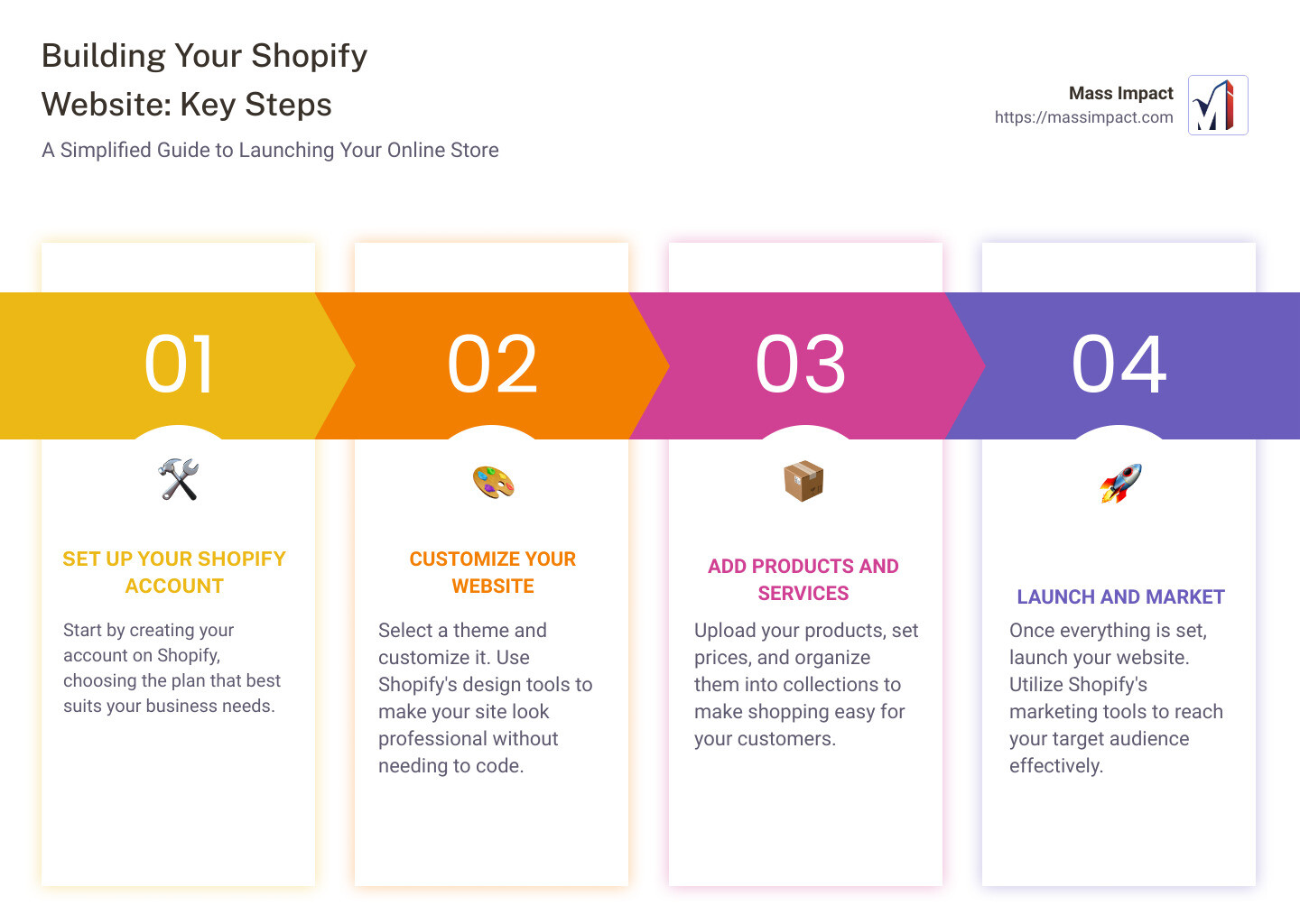
Starting your journey with Shopify is like opening a door to endless possibilities. Whether you’re an entrepreneur ready to take on the ecommerce world or a small business looking to expand online, setting up your Shopify account is your first step towards success. Let’s break down this process into simple, manageable steps.
Create Your Shopify Account
Creating your Shopify account is as easy as pie. All you need is an email address, a password, and an idea for your store name. Go to Shopify’s website and fill in these details. It’s that simple! You’re not just signing up for an account; you’re laying the foundation of your future business.
Select Plans
Shopify offers various plans to suit different business sizes and needs. From the Basic Shopify plan for newcomers to more advanced options for growing businesses, there’s something for everyone. Each plan comes with its own set of features, including web hosting, SSL certificates for secure connections, and access to Shopify’s payment gateway. You can start with a free trial to explore what Shopify has to offer before making any commitments.
Website Hosting
One of the best things about Shopify is that it takes care of your website hosting. This means you don’t have to worry about server maintenance, security updates, or ensuring your site stays up during peak traffic times. Shopify’s hosting is reliable and includes unlimited bandwidth, ensuring your website loads quickly for every visitor, every time.
Professionally Written Content
Content is king, and on Shopify, you have the freedom to create compelling, professionally written content that engages your audience. Whether it’s product descriptions, blog posts, or customer testimonials, Shopify’s easy-to-use content management system lets you publish without a hitch. Plus, there are plenty of apps and integrations available in the Shopify App Store to help with content creation, SEO optimization, and more.
By following these steps, you’re not just setting up a Shopify account; you’re building the foundation of your online business. Shopify’s all-in-one platform offers the tools and support you need to grow and succeed in the competitive world of ecommerce. So, take the plunge, create your account, and start your journey to online success today!
We’ll dive into choosing the right Shopify plan for your business, ensuring you have all the resources you need to thrive in the digital marketplace.
Learn more about setting up your Shopify account.
Choosing the Right Shopify Plan
Selecting the right Shopify plan for your business is like picking the perfect outfit for an occasion—it needs to fit well and serve the purpose. When it comes to Shopify, there’s a variety of plans to suit the needs of every business, from small startups to large enterprises. Let’s break down your options, so you can make an informed decision.
1. Free Trial
Before diving into any financial commitments, Shopify offers a 14-day free trial. This period is your playground to explore the platform’s capabilities, test out theme designs, and even upload some products. It’s a risk-free way to answer the question: “Can I build a website with Shopify that meets my business needs?”
2. Basic Shopify Plan
The Basic Shopify Plan is the entry-level option, designed for small businesses or individuals just starting their online journey. Priced at $29 per month, it covers all the essentials:
- Access to Shopify Payments, allowing you to accept credit card payments directly on your site without third-party apps.
- Unlimited products and bandwidth, so you can grow your inventory without worries.
- 24/7 customer support, ensuring help is always at hand.
This plan is perfect if your primary goal is to get your online store up and running with minimal upfront costs.
3. Shopify (Standard) Plan
As your business starts to grow, you might find yourself needing more from your Shopify experience. The Shopify (Standard) Plan is the next step up, offering enhanced features for $79 per month. This includes everything in the Basic plan, plus:
- Professional reports to help you understand your sales, customers, and inventory better.
- Lower credit card rates and transaction fees, saving you money as your sales volume increases.
This plan suits businesses that are establishing their brand and looking to optimize their operations.
4. Advanced Shopify Plan
For businesses that are scaling quickly and need advanced reporting and lower transaction fees, the Advanced Shopify Plan is the way to go. At $299 per month, it’s a significant investment, but the benefits are clear:
- Advanced report builder for customized reporting.
- Third-party calculated shipping rates, giving your customers more shipping options at checkout.
- The lowest credit card rates and transaction fees offered by Shopify.
This plan is ideal for high-volume sellers and businesses looking to expand into new markets.
5. Shopify Payments
Across all plans, Shopify Payments simplifies the process of accepting payments online. By using Shopify’s own payment gateway, you can eliminate transaction fees and enjoy lower credit card rates. This integrated solution also speeds up the setup process, allowing you to start selling faster.
Making Your Choice
When deciding between the Basic, Standard, and Advanced plans, consider your current business size, sales volume, and future growth expectations. Shopify’s flexibility means you can start small and upgrade as your business expands.
So, can you build a website with Shopify that meets your specific business needs? Absolutely. With its range of plans and the ability to upgrade at any time, Shopify is designed to grow with you.
Next, we’ll explore customizing your Shopify website to match your brand’s aesthetics and functionality requirements.
Learn more about Shopify’s pricing and plan options.
Customizing Your Shopify Website
Customizing your Shopify website is like painting your digital storefront the colors of your brand. It’s where you make your online space truly yours. Let’s dive into how you can turn a Shopify template into a unique representation of your business.
Themes
Shopify offers a wide array of themes, both free and premium, to jumpstart your website’s design. Think of themes as the foundation of your online store’s appearance. They dictate the layout, the placement of text and products, and the overall vibe of your site. Choosing a theme that aligns with your business model and aesthetic preference is crucial. The right theme can significantly enhance your customers’ shopping experience.
Customization
Now, onto customization. Shopify’s intuitive interface allows you to tweak almost every aspect of your theme without needing to write a single line of code. Want to change your store’s color scheme? Easy. Need to adjust font sizes or styles? No problem. These simple adjustments can dramatically affect the look and feel of your site.
For those who are more tech-savvy, Shopify doesn’t hold you back. Dive into the HTML and CSS of your site to make detailed customizations. This level of control ensures that if you can dream it, you can probably build it on Shopify.
Mobile Commerce
Your store needs to look good on screens of all sizes. Shopify themes are mobile responsive, meaning your site will automatically adjust to look its best whether it’s viewed on a desktop, tablet, or smartphone. This is not just about aesthetics; it’s about functionality. Ensuring a seamless shopping experience on mobile devices is crucial, as a significant portion of online shopping is done on the go.
SEO
Search Engine Optimization (SEO) is how you get found online. Shopify has built-in SEO features that help ensure your store ranks as high as possible in search results. From customizable headlines, titles, and meta tags to automatically generated sitemaps, Shopify covers the basics of SEO so you can focus more on creating great content and less on the technicalities.
Inventory Management
Managing your products on Shopify is a breeze. Upload unlimited products, organize them into collections, and track inventory levels all from your Shopify dashboard. Whether you’re selling handmade goods or a wide range of electronics, Shopify’s inventory system is designed to scale with your business.
Bandwidth
Worried about your website crashing during a traffic spike? Don’t be. Shopify provides unlimited bandwidth across all its plans, meaning your website can handle as many visitors as you can attract without slowing down or crashing. This reliability is key to maintaining a professional online presence and ensuring customer satisfaction.
In summary, customizing your Shopify website is about making strategic choices that align with your brand and business goals. From selecting the right theme to leveraging Shopify’s robust customization options, you have the power to create a store that not only looks great but also performs excellently on both desktop and mobile platforms. A well-customized Shopify store can significantly enhance your customers’ shopping experience, improve your site’s SEO, and efficiently manage your inventory and website traffic.
Ready to add products and bring your store to life? Let’s move on to the next step.
Learn how to build a completely custom Shopify website.
Adding Products and Services
Adding products to your Shopify store is like filling up shelves in a physical store. It’s where your store starts to come alive for your customers. Here are the steps and tips to make this process smooth and efficient:
-
Navigate to the Products Section: First, from your Shopify admin dashboard, click on “Products”. Here, you’ll find the option to add your products.
-
Fill in the Details: For each product, you’ll enter information such as the title, description, price, and images. The more detailed your descriptions, the better. Use clear, high-quality images to showcase your products.
-
Set Your Price: Pricing your products correctly is crucial. It’s not just about covering costs and making a profit; it’s also about understanding the value to your customer.
-
Track Your Inventory: Shopify offers inventory tracking. This means you’ll always know how many items you have in stock. It automatically updates when a sale is made, helping you avoid overselling.
Creating collections can help keep your store organized and make it easier for customers to find what they’re looking for. Here’s how to set them up:
- Go to Collections: From the Shopify admin, select “Products” then “Collections”.
- Create a New Collection: Click on “Create Collection” and fill in the details, such as the collection name and description. You can manually add products to a collection or set up conditions to automatically include products that meet certain criteria.
Why Collections Matter: Collections are like categories. They help customers navigate your store more easily, which can lead to better sales. For example, if you sell clothing, you might have collections for “Men”, “Women”, “New Arrivals”, and “Sale”.
Organizing Products within your store not only helps with customer navigation but also with your own management of the store. Here are some tips:
-
Use Tags Wisely: Tags can help you organize your products beyond collections. For example, you could tag items as “summer” or “eco-friendly”.
-
Think About Your Customer: Organize your store in a way that makes sense for the person shopping. If you sell tools, consider organizing by project type (e.g., painting, carpentry) rather than just by product type (e.g., brushes, hammers).
Inventory Tracking is a feature that should not be overlooked. It can save you from the embarrassment and customer frustration of selling products that are not actually in stock.
-
Set Up Inventory Alerts: Shopify can notify you when stock levels are low, so you can restock before running out.
-
Use SKUs: Stock Keeping Units (SKUs) are unique identifiers for each of your products. They make it easier to track your inventory, especially if you sell across multiple channels.
In summary, adding products and services to your Shopify store involves more than just listing items for sale. It’s about creating a shopping experience that is easy, informative, and enjoyable for your customers. By carefully adding products, organizing them into collections, and keeping track of your inventory, you’re setting your store up for success.
Now that your products are added and organized, you’re ready to launch your Shopify website and start selling to the world.
Learn how to build a completely custom Shopify website.
Launching Your Shopify Website
Launching your Shopify website marks the exciting moment your online store opens its virtual doors to customers worldwide. This step is pivotal in transforming your effort into success. Let’s guide you through this final phase — from making your store live to driving your first sales with effective marketing strategies.
Make Your Store Live
The journey from concept to launch culminates as you remove the password protection on your site. This action unveils your Shopify store to the public. Before you take this step, ensure every detail is polished — from product descriptions to the checkout process. A smooth user experience encourages first-time visitors to become loyal customers.
Dive into Marketing
With your store live, the focus shifts to attracting visitors. Shopify’s integrated marketing tools offer a seamless start. Here are key strategies to consider:
-
Google and Facebook Ads: Shopify simplifies ad creation for these platforms, allowing you to reach a wide audience quickly. By targeting specific demographics, interests, and behaviors, you can drive relevant traffic to your new store.
-
Shopify Marketing: Within your Shopify dashboard, explore the ‘Marketing’ section. This hub equips you with tools to create, manage, and analyze marketing campaigns. Whether it’s email blasts or social media posts, Shopify helps you engage with your audience effectively.
-
Campaigns: Launching campaigns is more than just promoting products. It’s about telling your brand’s story in a way that resonates with your target audience. Consider special promotions, limited-time offers, or exclusive content to generate buzz and encourage sales.
Leverage the Shopify App Store
The Shopify App Store is a treasure trove of tools designed to enhance your marketing efforts. From SEO optimization apps to social media integration tools, these resources can significantly amplify your store’s visibility and appeal. Explore apps that automate email marketing, streamline social media posts, or provide detailed analytics to refine your strategies.
Launching your Shopify website is just the beginning. The real challenge — and opportunity — lies in growing your store. Regularly review your marketing performance, listen to customer feedback, and stay agile, ready to adapt your strategies to meet evolving market demands.
The path ahead is exciting. With Shopify’s robust platform and a clear marketing strategy, you’re well-equipped to turn your online store into a thriving business.
In the next section, we’ll tackle some frequently asked questions about building a Shopify website, ensuring you have all the knowledge needed to succeed in your ecommerce journey.
Frequently Asked Questions about Building a Shopify Website
Can I build a website with Shopify for informational purposes?
Yes, you absolutely can. While Shopify is widely recognized for its e-commerce capabilities, it’s also a versatile platform that allows you to build an information-based website. Whether you’re looking to create a site for your business that showcases your services, a portfolio, or even a blog, Shopify has got you covered. With a wide array of templates and extensive design customization options, you can tailor your site to match your vision perfectly.
How long does it take to build a Shopify website?
The time it takes to build a Shopify website can vary greatly depending on how complex you want your site to be. For a Basic Store, you could be looking at a setup time of 1-5 days. This is ideal for those who want to get up and running quickly with a simple layout and minimal customization.
For a more detailed site, a Standard Store could take anywhere from 2-4 weeks to set up. This allows time for more in-depth customization, adding a variety of products, and implementing SEO strategies.
And for those who are aiming for an Advanced Store with high levels of customization, advanced features, and integration with third-party services, you might be looking at a timeline of 4-8 weeks. This gives you ample time to perfect your online presence and ensure everything runs smoothly.
Can I sell on multiple marketplaces with Shopify?
Yes, Shopify’s flexibility extends to its ability to integrate with multiple marketplaces. You can expand your reach beyond your Shopify store by selling on platforms like Amazon, eBay, and Etsy. Shopify’s native partner integrations make it easy to manage your listings and sales across different channels from one central place. This multi-channel approach not only increases your potential customer base but also streamlines your operations, making it easier to manage your online business.
In summary, whether you’re building an informational site, setting up your store, or expanding to multiple marketplaces, Shopify offers a comprehensive set of tools and features to help you succeed. With the right planning and execution, your Shopify website can become a powerful asset for your business.
Moving forward, the success of your Shopify website also hinges on continuous learning and adaptation. Embrace the vast resources available and keep refining your strategy to grow your online presence.
Let’s continue to explore how you can maximize your Shopify experience and take your online business to new heights in the following sections.
Conclusion
Congratulations! You’re now equipped with the knowledge to start building your Shopify website. But remember, launching your website is just the beginning. The digital world is always evolving, and so should your online store. That’s where we come in.
Mass Impact is your partner in navigating the complexities of digital marketing. Our expertise in SEO web design, social media management, and creative graphic design solutions ensures your Shopify store not only looks great but also ranks well in search engines and engages your audience on social media platforms.
-
SEO web design: We understand that a beautiful website is not enough. It needs to be found. Our SEO web design strategies are tailored to increase your store’s visibility in search engine results, driving more organic traffic to your site.
-
Social media management: Social media is a powerful tool to connect with your audience. Our social media management services ensure your brand maintains an active and engaging presence across platforms, building brand awareness and loyalty.
-
Graphic design: First impressions matter. Our creative graphic design team crafts visually appealing and memorable designs that resonate with your target audience, setting your brand apart from the competition.
At Mass Impact, we’re not just about ticking off tasks. We’re about driving real, tangible results for your business. Our approach is data-driven, innovative, and personalized to meet the unique needs of your Shopify store. Whether you’re looking to enhance your website’s SEO, maximize your social media impact, or need creative graphics that tell your brand’s story, we have the expertise to help you succeed.
Building and growing a Shopify website can be a challenging journey, but you don’t have to do it alone. Partner with us and leverage our digital marketing services to boost your online presence and sales. Let’s work together to make your Shopify store a success.
For more information on how we can help your business thrive in the digital landscape, visit Mass Impact.
Together, let’s turn your vision into reality and propel your Shopify store to its full potential.