
Elevate Your Digital Presence with the Right Website Solutions
Website solutions are essential for businesses aiming to amplify their digital presence and effectively engage with their target audience. If you’re on the hunt for the right website solution, here’s a quick answer:
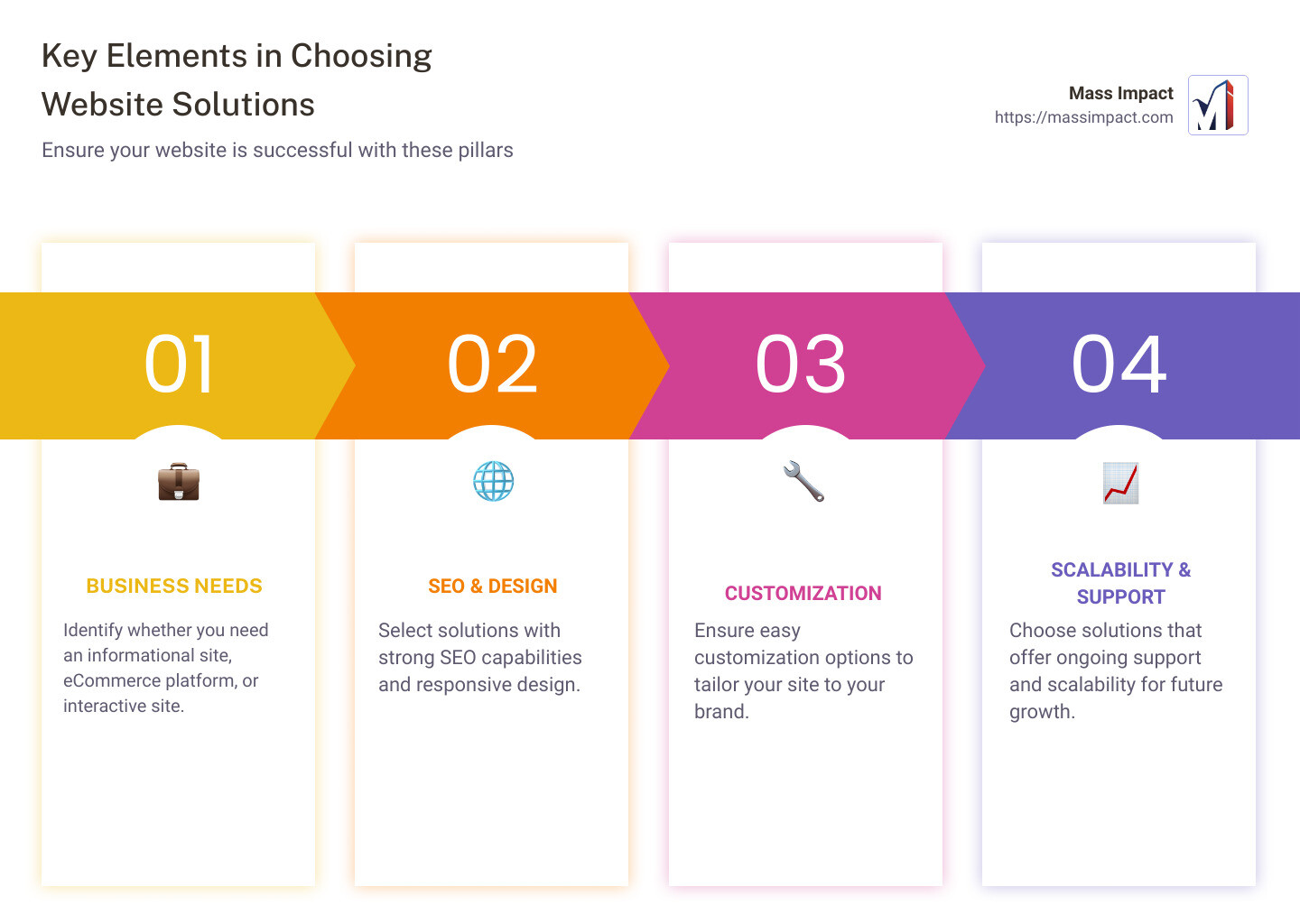
- Identify your business needs (e.g., informational, eCommerce).
- Select a website solution with strong SEO, responsive design, and easy customization.
- Ensure ongoing support and scalability for future growth.
In today’s digital age, establishing a strong online presence is critical for businesses of all sizes. Website solutions encompass a wide array of services including web design, SEO, content management systems, and more, making it easier for businesses to stand out and engage their audience.
I’m Haiko de Poel Jr. With a rich background in digital innovation and strategic marketing, I’ve guided numerous companies in leveraging website solutions for optimal growth. Let’s dive in to explore how you can choose the best website solutions for your business needs.
What Are Website Solutions?
Website solutions are comprehensive services that help businesses create, manage, and optimize their online presence. These solutions typically include a mix of web development, web design, front-end and back-end development, web hosting, and content management systems (CMS).
Components of Website Solutions
-
Web Development: This involves building the structure and functionality of a website. It includes both front-end and back-end development.
-
Web Design: Web design focuses on the visual aspects of a website. It includes the layout, color schemes, typography, and user interface (UI) design.
-
Front-End Development: This is what users see and interact with on a website. It involves coding languages like HTML, CSS, and JavaScript to create a responsive and engaging user experience.
-
Back-End Development: The back-end is the server side of a website. It involves databases, server logic, and application programming interfaces (APIs). It ensures that everything on the front-end works smoothly.
-
Web Hosting: Web hosting services store your website’s data and make it accessible on the internet. It’s like renting space on a server to house your website files.
-
Content Management Systems (CMS): A CMS allows users to manage website content without needing extensive technical knowledge. Popular CMS platforms include WordPress, Joomla, and Drupal. These systems offer templates and plugins to customize and extend website functionality.
Why Are Website Solutions Important?
Website solutions are crucial for businesses because they:
- Enhance Online Visibility: Good web design and development ensure that your site is optimized for search engines, making it easier for potential customers to find you.
- Improve User Experience: Responsive and intuitive designs make it easier for users to navigate your site, increasing engagement and conversions.
- Provide Scalability: As your business grows, your website can scale with you, adding new features and handling more traffic.
- Ensure Security: Professional web hosting and back-end development ensure that your website is secure from cyber threats.
Real-World Example
Consider a small business looking to expand its online presence. They might start with a simple CMS like WordPress for easy content updates, paired with a reliable web hosting service. As they grow, they can integrate SEO tools, eCommerce solutions, and custom web designs to attract more customers and improve their online sales.
By leveraging website solutions, businesses can create a robust digital presence that not only reflects their brand but also drives growth and engagement.

Next, we’ll explore the different types of website solutions available and how to choose the best one for your business needs.
Types of Website Solutions
When it comes to website solutions, there are three main types to consider: informational websites, transactional/eCommerce websites, and interactive websites. Each serves a different purpose and caters to specific business needs.
Informational Websites
Informational websites are designed to provide visitors with detailed information about a business, product, or service. These sites often include pages like Home, About Us, Services, and Contact.
Key Features:
– Content Management Systems (CMS): Platforms like WordPress make it easy to update content without needing technical skills.
– SEO Tools: Ensures your site ranks well on search engines.
– Responsive Design: Optimizes your site for both desktop and mobile devices.
Example: A small business might use an informational website to showcase their services, share customer testimonials, and provide contact information.
Transactional/eCommerce Websites
Transactional websites, also known as eCommerce websites, allow businesses to sell products or services online. These sites include features that facilitate online transactions, such as shopping carts and payment gateways.
Key Features:
– Product Listings: Detailed descriptions, images, and prices of products.
– Secure Payment Processing: Ensures safe transactions through encrypted payment gateways.
– Inventory Management: Keeps track of stock levels and updates automatically.
Case Study: A local bakery could use an eCommerce website to sell baked goods online, allowing customers to place orders and make payments directly through the site.
Interactive Websites
Interactive websites engage users by allowing them to interact with the content. These sites often include features like forums, quizzes, and user-generated content.
Key Features:
– User Accounts: Allows visitors to create profiles and log in.
– Dynamic Content: Content that changes based on user interaction.
– Community Building Tools: Forums, comment sections, and social sharing options.
Example: An educational institution might use an interactive website to provide students with access to online courses, interactive quizzes, and discussion forums.
Next, we’ll explore the key features to look for in website solutions to ensure your business gets the best possible online presence.
Key Features to Look for in Website Solutions
When it comes to choosing the right website solutions for your business, certain features are non-negotiable. Let’s look at the key features that ensure your site performs well and meets your business needs.
Reliability
Reliability is crucial. Your website should be up and running 24/7. Downtime can cost you customers and revenue. Look for solutions that offer high uptime guarantees, like 99.9% uptime. This ensures your site is always available for your audience.
Pricing
Pricing matters, especially for small businesses. Be clear about your budget and look for transparent pricing. Some solutions offer tiered plans, like Basic, Enhanced, and Premium, to fit different needs and budgets. For instance, a Basic plan might include essential features, while a Premium plan could offer advanced functionalities like e-commerce and additional email accounts.
Security
Security is non-negotiable. Your website must protect user data and comply with regulations. Features like SSL certificates, PCI DSS compliance, and fraud analysis are essential. For example, Squarespace Enterprise offers SOC 2 audit compliance, ensuring high standards for customer data protection.
Scalability
Scalability allows your website to grow with your business. Look for solutions that can handle increasing traffic and data without compromising performance. Unlimited bandwidth and storage are good indicators of a scalable solution.
SEO Tools
Without SEO tools, your website might never be found. Effective SEO tools include keyword research, meta tag optimization, and quality backlinks. Built-in SEO features can help you rank higher on search engines and attract more visitors.
User Experience
User Experience (UX) is all about making your site easy to navigate. Key elements include:
- Intuitive Navigation: Clear menus and logical layouts.
- Fast Load Times: Slow pages frustrate users. Aim for quick load speeds.
- Clear Calls-to-Action (CTAs): Guide users on what to do next, like signing up for a newsletter.
Customization
Customization lets you tailor your website to your brand. Look for solutions that offer:
- Themes and Templates: A wide range of themes can help you quickly create a professional-looking site.
- Coding Flexibility: Options to use HTML, CSS, or custom code for advanced customization.
- Drag-and-Drop Builders: Easy-to-use tools for those without coding skills.
By focusing on these key features, you can ensure your website not only attracts visitors but keeps them engaged and coming back.
Next, we’ll explore the top website solutions for different business needs.
Top Website Solutions for Different Business Needs
Choosing the right website solution depends on your specific business needs. Below, we’ll break down the best options for small businesses, enterprises, nonprofits, and educational institutions.
Small Businesses
For small businesses, affordability and ease of use are crucial.
-
Templates and CMS: Platforms like WordPress offer a variety of templates that make it easy to create a professional-looking site without needing to code. This is perfect for small business owners who want to get online quickly and efficiently.
-
Cost-Effective Solutions: Small businesses often have tight budgets. Look for solutions that offer basic and enhanced plans. These plans usually include essential features like email accounts, SEO tools, and social media integration.
Enterprises
Enterprises require scalable and secure solutions to handle large volumes of traffic and data.
-
Scalability: Enterprises need to attract and engage large amounts of website traffic without slowing down. WordPress is a popular choice due to its performance and ability to scale.
-
Security and SSO: Security is a top priority. Platforms like Squarespace Enterprise offer rigorous security controls and single sign-on (SSO) integrations with providers like Google and Okta.
-
Centralized Dashboard: A centralized dashboard helps manage multiple websites, making it easier to monitor performance and make updates.
-
Custom Templates: Enterprises often need custom templates to maintain brand consistency across multiple sites.
Nonprofits
Nonprofits need cost-effective solutions that help them engage with donors and build a community.
-
Cost-Effective: WordPress is often the go-to for nonprofits due to its open-source nature and low cost. It allows nonprofits to build dynamic sites without diverting funds away from their primary mission.
-
Community Building: Features like blogs, forums, and social media integration are essential for building a community around your cause.
-
Donor Engagement: Tools for managing donations, such as donation forms and CRM integrations, are crucial for nonprofits.
Educational Institutions
Educational institutions need features that support both administrative and